Examples
The .ark source on the left, the SVG it compiles to on the right —
every render below was produced by the CLI from the file beside it.
A simple pipeline
Three top-level nodes laid out left to right, joined by arrows. With no anchors given, each arrow auto-routes to the nearest facing edges. A bare margin: 20 at the @layout root is the document-wide default margin — one knob to space the whole diagram out.
pipeline.ark
webapp {
  label: "Web App"
}
api {
  label: "API"
}
database {
  label: "Database"
}

webapp --> api
api --> database

@layout {
  margin: 20
}
pipeline.ark
Orthogonal routing (route: orthogonal)
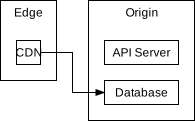
Set route: orthogonal once at the @layout root and every arrow is drawn as an axis-aligned path between its facing edges instead of a straight diagonal. Here the CDN sits high on the left and the Database low on the right, so their connector turns through the gap as a clean Z — and it travels in its own lane: the gap between the two contexts widens to hold the line, so it sits in breathing room instead of crowding either box. (The default, route: straight, is the auto-cardinal line above.)
routing.ark
edge {
  label: "Edge"
  cdn { label: "CDN" }
}
origin {
  label: "Origin"
  api      { label: "API Server" }
  database { label: "Database" }
}

@layout {
  route: orthogonal
  margin: 16
  edge   { direction: vertical }
  origin { direction: vertical }
}

edge.cdn --> origin.database
routing.ark
Routing around obstacles
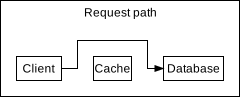
In route: orthogonal mode an arrow routes around the boxes that lie between its endpoints rather than cutting through them. The link from Client to the Database would run straight through Cache, so it detours up and over it as an axis-aligned path — and travels in its own lane: the row's top perimeter widens to hold the line above the boxes. Anchors pinned to an edge leave perpendicular to that edge, so you stay in control of where a line departs.
detour.ark
# With route: orthogonal an arrow routes *around* the boxes between its endpoints
# instead of cutting through them. The link from Client to the Database would run
# straight through Cache, so it detours up and over it as an axis-aligned path.
tier {
  label: "Request path"
  client   { label: "Client" }
  cache    { label: "Cache" }
  database { label: "Database" }
}

@layout {
  route: orthogonal
  margin: 16
  tier { direction: horizontal }
}

tier.client --> tier.database
detour.ark
Lanes for parallel arrows
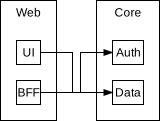
When several arrows run along the same channel, each gets its own lane: the channel widens to hold them all and the parallel runs sit side by side instead of overlapping. Here both UI → Data and BFF → Auth cross the gap between the columns, so the gap opens into two lanes.
lanes.ark
# Two arrows that both cross the gap between the columns each get their own lane:
# the gap widens to hold both, so the parallel vertical runs sit side by side
# instead of overlapping. web.ui --> core.data drops down one lane; web.bff -->
# core.auth climbs the other.
web {
  label: "Web"
  ui  { label: "UI" }
  bff { label: "BFF" }
}
core {
  label: "Core"
  auth { label: "Auth" }
  data { label: "Data" }
}

@layout {
  route: orthogonal
  margin: 16
  web  { direction: vertical }
  core { direction: vertical }
}

web.ui  --> core.data
web.bff --> core.auth
lanes.ark
Nesting & direction
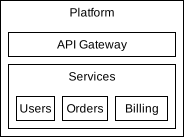
Nodes nest to any depth, and a separate @layout block arranges each parent's children with a direction. Here a vertical Platform stacks a gateway above a horizontal row of services.
nesting.ark
platform {
  label: "Platform"

  gateway {
    label: "API Gateway"
  }

  services {
    label: "Services"

    users   { label: "Users" }
    orders  { label: "Orders" }
    billing { label: "Billing" }
  }
}

@layout {
  platform          { direction: vertical }
  platform.services { direction: horizontal }
}
nesting.ark
Bounded contexts with anchors
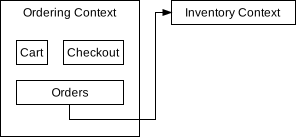
A Domain-Driven Design sketch: two bounded contexts, a borderless box: none node that groups Cart and Checkout for layout only, and an arrow routed through named anchors and a nested node path. With route: orthogonal, the arrow leaves the Orders bottom anchor straight down, follows the channel below it and around Ordering Context, and enters Inventory Context from the left — each run a full margin clear of the boxes.
contexts.ark
ordering {
  label: "Ordering Context"

  row {
    cart     { label: "Cart" }
    checkout { label: "Checkout" }
  }

  orders {
    label: "Orders"
    anchors: [db]
  }
}

inventory {
  label: "Inventory Context"
  anchors: [api]
}

@layout {
  route: orthogonal
  margin: 16
  ordering     { direction: vertical }
  ordering.row { box: none; margin: 0; direction: horizontal }

  ordering.orders { anchor db: [0.5, 1.0] }
  inventory       { anchor api: [0.0, 0.5] }
}

ordering.orders#db --> inventory#api
contexts.ark
Reusable layout (@block & @use)
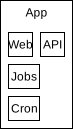
A named @block bundles layout you import with @use — explicit and opt-in, with no cascade matching nodes for you. Both groups pull in the same borderless row; the second then overrides its direction directly, because a direct property always beats an imported one.
reuse.ark
app {
  label: "App"

  group1 { web { label: "Web" }   api { label: "API" } }
  group2 { jobs { label: "Jobs" } cron { label: "Cron" } }
}

@layout {
  # A reusable layout bundle. There is no cascade: @use is an explicit, opt-in
  # import, and a property set directly on a node overrides the imported one.
  @block row { box: none; direction: horizontal }

  app        { direction: vertical }
  app.group1 { @use row }                       # imported: box none + horizontal
  app.group2 { @use row; direction: vertical }  # same block, direction overridden
}
reuse.ark
Semantic kinds (kind)
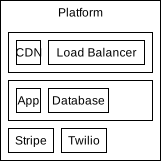
A node's kind is a semantic tag — what the component is — that implicitly imports the @block of the same name as a layout baseline. Both tiers share one tier rule instead of repeating it, and the built-in invisible kind makes external a borderless grouping.
kinds.ark
platform {
  label: "Platform"

  # `kind` is a semantic tag — what the node *is*. A custom kind imports the
  # @block of the same name as a layout baseline, so both tiers lay out the same
  # way from one rule, with no per-node repetition.
  edge { kind: tier; cdn { label: "CDN" } lb { label: "Load Balancer" } }
  core { kind: tier; app { label: "App" } db { label: "Database" } }

  # The built-in `invisible` kind applies box: none, so this node groups its
  # children for layout only — no border — while keeping its id and path.
  external {
    kind: invisible
    stripe { label: "Stripe" }
    twilio { label: "Twilio" }
  }
}

@layout {
  @block tier { direction: horizontal }

  platform          { direction: vertical }
  platform.external { direction: horizontal }
}
kinds.ark
Regrouping with @group
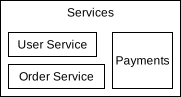
Inside a node's @layout you can list its children to reorder them and wrap a run of them in an anonymous @group for purely visual nesting. Here a vertical group of two services sits, as one unit, to the left of Payments — the group draws no border and adds no path segment.
arrangement.ark
services {
  label: "Services"

  userService  { label: "User Service" }
  orderService { label: "Order Service" }
  payments     { label: "Payments" }
}

@layout {
  services {
    direction: horizontal

    # Wrap two children in an anonymous @group so they stack vertically and sit,
    # as one unit, to the left of payments. A @group is invisible and has no id.
    @group { direction: vertical; userService; orderService }
    payments
  }
}
arrangement.ark
Grid arrangement (cols / rows)
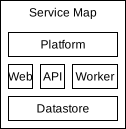
Give a node cols (and optionally rows) to arrange its children in 2-D: each child sets its col/row and can span tracks with colSpan. Columns and rows are sized jointly, so the cells stay aligned. direction is just sugar for a single-track grid (vertical is cols: 1).
grid.ark
# A grid arranges children in 2-D. `cols` fixes the columns; children place
# themselves with col/row, and span tracks with colSpan. Columns and rows are
# sized jointly, so the cells stay aligned in a tidy table.
board {
  label: "Service Map"

  title  { label: "Platform" }
  web    { label: "Web" }
  api    { label: "API" }
  worker { label: "Worker" }
  store  { label: "Datastore" }
}

@layout {
  board { cols: 3 }
  board.title  { col: 1; row: 1; colSpan: 3 }   # full-width header
  board.web    { col: 1; row: 2 }
  board.api    { col: 2; row: 2 }
  board.worker { col: 3; row: 2 }
  board.store  { col: 1; row: 3; colSpan: 3 }    # full-width footer
}
grid.ark
Sequence diagram (grid as lanes)
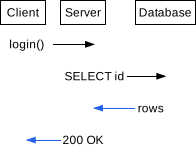
The grid is enough to draw a UML-style sequence diagram: columns are participants and rows are time. Each message is one row with a box: none label for the sender and an invisible receiver stretched across its lane, so the arrow runs lane-to-lane. Lanes a message skips carry no cell (sparse placement). Messages sit on consecutive rows so they stack one margin apart; leaving a row empty turns it into a spacer track — a track no cell covers still reserves a minimum size — if you want more vertical air. Returns are coloured because there is no dashed stroke, and the message text is the sender's label since arrows carry no labels of their own yet.
sequence.ark
# A UML-style sequence diagram, built entirely from the grid arrangement.
#
# Columns are participants; rows are time. Each message is one row holding a
# labelled sender and an invisible receiver, so the arrow runs across the lane.
# Lanes a message skips carry no cell (sparse placement). Messages sit on
# consecutive rows so they stack one margin apart; leave a row empty and it
# becomes a spacer track (it still reserves a minimum size) if you want more air.
seq {
  client { label: "Client" } server { label: "Server" } db { label: "Database" }

  m1 { label: "login()" }   m1t { kind: invisible }
  m2 { label: "SELECT id" } m2t { kind: invisible }
  m3 { label: "rows" }      m3t { kind: invisible }
  m4 { label: "200 OK" }    m4t { kind: invisible }
}

@layout {
  margin: 8
  seq { box: none; cols: 3 }   # three participant lanes; rows grow with time

  seq.client { col: 1; row: 1 }  seq.server { col: 2; row: 1 }  seq.db { col: 3; row: 1 }

  # One message per row; the sender is a box:none label, the receiver an
  # invisible cell stretched across its lane so the arrow lands on its centre.
  seq.m1 { col: 1; row: 2; box: none }  seq.m1t { col: 2; row: 2; justify: stretch }
  seq.m2 { col: 2; row: 3; box: none }  seq.m2t { col: 3; row: 3; justify: stretch }
  seq.m3 { col: 3; row: 4; box: none; pathColor: #2563eb }  seq.m3t { col: 2; row: 4; justify: stretch }
  seq.m4 { col: 2; row: 5; box: none; pathColor: #2563eb }  seq.m4t { col: 1; row: 5; justify: stretch }
}

# Returns are coloured (there is no dashed-stroke control); the message text is
# the sender's label (arrows carry no labels of their own yet).
seq.m1 --> seq.m1t#center
seq.m2 --> seq.m2t#center
seq.m3 --> seq.m3t#center
seq.m4 --> seq.m4t#center
sequence.ark
Styling (colour & stroke width)
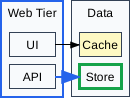
Hex colours and stroke widths live in @layout like any other property: borderWidth/borderColor/backgroundColor style a node's box, and pathWidth/pathColor style the arrows that start at it. Each is settable per node, document-wide (a bare property at the sheet root — the fallback here paints every box), or bundled in a @block (the blue border on Web Tier is one @use accent). Only API sets a path style, so just its arrow turns blue while UI's keeps the default — and there is no cascade, so a child never inherits a parent's colour.
styling.ark
web {
  label: "Web Tier"
  ui  { label: "UI" }
  api { label: "API" }
}
data {
  label: "Data"
  cache { label: "Cache" }
  store { label: "Store" }
}

web.ui  --> data.cache
web.api --> data.store

@layout {
  # A bare style property at the sheet root is the DOCUMENT-WIDE default — the
  # fallback for every node and arrow that sets none. Colours are hex.
  borderColor: #334155
  backgroundColor: #f8fafc

  # Bundle a look into a @block and pull it in with @use, like any other layout.
  @block accent { borderColor: #2563eb; borderWidth: 2 }
  web { @use accent }                  # blue 2px border, imported

  # pathColor / pathWidth style only the arrows that START at this node — so the
  # arrow from api turns blue and thick, while the one from ui keeps the default.
  web.api { pathColor: #2563eb; pathWidth: 2 }

  data.cache { backgroundColor: #fef9c3 }      # per-node fill override
  data.store { borderColor: #16a34a; borderWidth: 3 }
}
styling.ark
Arrow labels
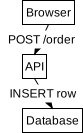
An arrow carries text with a body block — a --> b { label: "…" } — the same { … } shape a node uses. The label is drawn at the midpoint of the arrow's longest run, on an opaque plate so the line stays legible. In a vertical flow each label tucks beside its arrow and the canvas grows to fit it.
labels.ark
# Arrow labels: `a --> b { label: "…" }` puts text on an arrow, using the same
# `{ … }` body a node uses. The label is drawn at the midpoint of the arrow's
# longest run; in a vertical flow like this each one tucks beside its arrow.
flow {
  browser { label: "Browser" }
  api     { label: "API" }
  db      { label: "Database" }
}

@layout {
  margin: 30
  flow { box: none; direction: vertical }
}

flow.browser --> flow.api { label: "POST /order" }
flow.api     --> flow.db  { label: "INSERT row" }
labels.ark
Labels flow in the channel
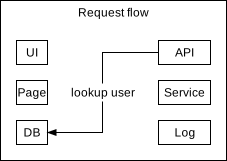
A label is treated as content of the channel its arrow routes through. With route: orthogonal the run travels the gap between the two columns, so that gap widens to hold the text — the columns spread apart and the label can never overlap a box, exactly as a long node label grows its own box.
labels-routed.ark
# A label is treated as content of the channel its arrow routes through. In
# route: orthogonal mode the vertical run travels the gap between the two
# columns, so that gap widens to hold the text — the columns spread apart and
# the label never overlaps a box (just as a long node label grows its box).
grid {
  label: "Request flow"
  ui   { label: "UI" }                 api { label: "API" anchors: [out] }
  page { label: "Page" }               svc { label: "Service" }
  db   { label: "DB" anchors: [in] }   log { label: "Log" }
}

@layout {
  route: orthogonal
  margin: 16
  grid { cols: 2 }
  grid.ui   {col:1; row:1}  grid.api {col:2; row:1}
  grid.page {col:1; row:2}  grid.svc {col:2; row:2}
  grid.db   {col:1; row:3}  grid.log {col:2; row:3}
  grid.api { anchor out: [0.0, 0.5] }   # left edge of API
  grid.db  { anchor in:  [1.0, 0.5] }   # right edge of DB
}

grid.api#out --> grid.db#in { label: "lookup user" }
labels-routed.ark
Labels with line breaks & styling
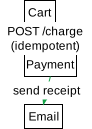
A label is plain text, so it may span lines with \n, and it coexists with arrow styling: pathColor on a node colours the arrows that start there while the label stays on its plate. (Straight-mode labels need open space beside the line — a vertical flow gives them room; for a cramped horizontal layout use route: orthogonal, which makes room.)
labels-styled.ark
# A label is plain text — it may span lines with `\n` — and coexists with arrow
# styling: pathColor on a node colours the arrows that start there, while the
# label stays on its own plate. Straight-mode labels need room beside the line,
# so a vertical flow (open canvas to the side) shows them off well.
checkout {
  cart    { label: "Cart" }
  payment { label: "Payment" }
  email   { label: "Email" }
}

@layout {
  margin: 28
  checkout { box: none; direction: vertical }
  checkout.payment { pathColor: #16a34a }   # arrows leaving Payment turn green
}

checkout.cart    --> checkout.payment { label: "POST /charge\n(idempotent)" }
checkout.payment --> checkout.email   { label: "send receipt" }
labels-styled.ark
Want the full grammar? Head to the syntax reference.